See who doesn't follow you back on TikTok
Select the data download TikTok gives you, and the accounts you follow that don't follow you back are listed first. Free, online and without login: the file is read in this browser tab and never uploaded.
No ZIP yet? Request it first (step 1 below); you get an email when it's ready. Already downloaded it? On iPhone it's in the Files app under Downloads, on Android in the Downloads folder.
No ZIP yet? Three steps
-
Request your data from TikTok
Open TikTok's download page (opens in a new tab)Your download is usually ready within minutes to a few hours, and you get an email. Then come back to this page.
Which options do I pick?
In the TikTok app, open Profile → Menu → Settings and privacy → Account → Download your data (on the web: Settings → Download your data), and select:
- All data
- File format: JSON
- Request data
-
Wait until the file is ready
TikTok needs a few hours, sometimes up to a few days. The file then appears under “Download data” and stays available for 4 days.
-
Upload the ZIP here
We read your follower and following lists from user_data_tiktok.json (or Follower.txt and Following.txt).
Your results
History on this device
Only the account names are stored, in this browser. That's how the next analysis can show who unfollowed you.
Safari can delete data that websites saved if you don't visit them for 7 days. Download a backup file to keep your history, and restore it before your next analysis.
TikTok has no screen that lists everyone who doesn't follow you back. Your Following list shows who you follow, and your Followers list shows who follows you, but nothing puts the one-sided follows in one place. Your TikTok data download contains both lists, and the checker above compares them.
Short answer: in the TikTok app, request your data under Settings and privacy → Account → Download your data, with all data selected and JSON as the format. Select the ZIP in the tool above. The Don't follow you back tab lists every account you follow that isn't among your followers. It's free, there is no login, and the file is read in this browser tab without being uploaded. For one or two people, you don't need a download: search your Followers list in the app.
How to see who doesn't follow you back on TikTok
- Request your data. In the TikTok app, tap Profile, then the Menu ☰ button, then Settings and privacy → Account → Download your data. On a computer, log in and open tiktok.com/setting/download-your-data.
- Pick the options. Select all data, so your follower and following lists are sure to be included. Choose JSON as the file format (TXT may be preselected), then tap Request data.
- Wait, then download the ZIP. According to TikTok's Help Center, preparing the file may take a few days, and TikTok notifies you in the app when it's ready. Open Download your data again, switch to the Download data tab and tap Download. The file stays available for up to 4 days.
- Select the ZIP in the tool above. Don't unzip it first. The results open on their own page, starting with Don't follow you back and the number of accounts on it.
The tool reads two lists from the download. In a JSON download, both are in user_data_tiktok.json, in a Follower and a Following section. In a TXT download with English as the app language, they are Follower.txt (people who follow you) and Following.txt (people you follow). Accounts you follow that are missing from your followers end up on the list. Matching is by username, and the date next to each name is the day you followed that account, taken from your file.
JSON is the safer choice: its structure is the same in every app language, while TXT file names follow your app language. If your phone already unpacked the ZIP, select user_data_tiktok.json from the folder, or Follower.txt and Following.txt together. Menus on the app and website, and what else is in the ZIP, are covered in the guide how to request and download your TikTok data.
What the list means, and what it doesn't
"Doesn't follow you back" describes one moment: the moment TikTok created your file. It says nothing about why. The accounts on it usually fall into these groups:
- Creators, brands, news accounts and public figures. You follow them for their videos. Most don't follow their audience back, so a one-way follow is the normal case here.
- People you followed first who never followed back, or haven't seen your follow yet.
- Accounts that unfollowed you at some point. A single download can't separate them from the two groups above.
- Accounts that were deactivated, deleted or banned, or that blocked you. They can be missing from your followers even though the person never chose to unfollow you.
Treat the list as a to-do list, not a verdict. TikTok's file doesn't record when someone unfollowed you, so finding out who actually stopped following you takes a second download later. See below.
Why someone who follows you is on the list
This is the most common surprise. It usually has one of three causes:
- They followed you after the file was created. The download doesn't update itself. Anyone who followed you back since then is still listed. TikTok's file can take days to prepare, so the gap can be longer than you think.
- Recent changes are missing. TikTok notes that the last 24 to 48 hours of some data may not be included in your file.
- The download is from another account. If you switch between several TikTok accounts, the data download belongs to the account that was active when you requested it. Check that it's the one you want, or every name on the list will be off.
Before you unfollow someone you know personally, check them by hand as described in the next section. It takes a few seconds and catches all three cases.
Check if one person follows you back
For a single account, the TikTok app is faster than any download:
- Tap Profile at the bottom right.
- Tap your Followers count to open the list.
- Type the person's username into the search field at the top. If they appear, they follow you. If they don't, they don't follow you right now.
TikTok calls followers you follow back Friends. On your Following tab, the button next to an account usually says Friends when you follow each other and Following when the follow only goes one way. In your Followers list, someone you don't follow yet gets a Follow back button. TikTok renames buttons from time to time, so if a label looks different on your screen, go by the Followers search above.
You can also check from their side: open their profile, tap their Following count and search for your username. That only works when you're allowed to see their lists. A private account shows them only to followers it approved.
No search result and no profile at all usually means a block, a deactivation or a deleted account, not an unfollow.
Sort, search and export the list
A few hundred names are easier to handle with a system. Each tab has these tools:
- Oldest first. The date is when you followed the account. Someone you followed years ago who still doesn't follow you back is unlikely to start now.
- Newest first shows accounts you followed recently. Give them a few days before you decide.
- Search finds one account in a long list.
- Download this list (CSV) gives you a spreadsheet. Add a "keep" or "unfollow" column and sort before you change anything on TikTok.
- Open takes you to the profile on TikTok in a new tab. With Remember this result on this device switched on, rows you've opened stay marked Opened, even after a reload, so you can pick up where you left off on another day.
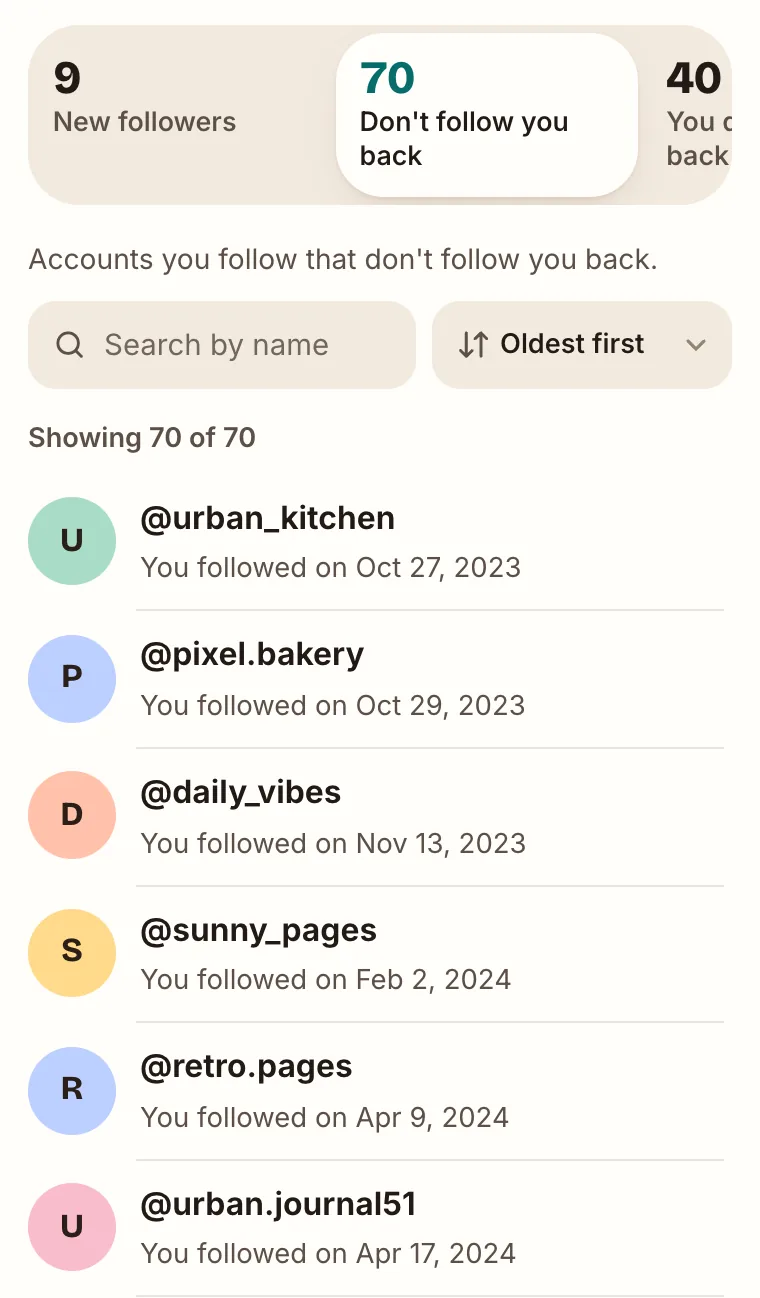
The other tabs answer the follow-back question from the other side:
| Tab | Who's on it | Typical use |
|---|---|---|
| Don't follow you back | Accounts you follow that aren't among your followers | Deciding whom to unfollow |
| You don't follow back | Accounts that follow you, but you don't follow them | Finding people to follow back, or spam followers to remove |
| Mutual | Accounts where you follow each other, what TikTok calls Friends | Seeing your two-way connections in one list |
The file has usernames and dates only, so the results show no profile pictures or display names, and the tool can't tell whether an account is private or inactive. Accounts you follow for their content usually belong in the "keep" column, whether or not they follow you.
Unfollow non-followers without hitting "Following too fast"
The tool can't unfollow anyone. It only reads your download and never connects to TikTok. You unfollow in the TikTok app: open the profile and tap the Following button, as TikTok's Following and unfollowing article describes. The button then switches back to Follow.
- There is no published unfollow limit. TikTok doesn't say how many accounts you may follow or unfollow per hour or day, and numbers you read elsewhere are guesses. Its Help Center has one article on speed, "Following too fast", which says that following accounts too quickly could temporarily disable your account. Work in small batches and spread a big clean-up over several days.
- Stop when TikTok pushes back. If you see a "too fast" or "try again later" message, pause and continue on another day instead of retrying.
- Keep your password to yourself. Mass-unfollow apps and extensions act as you. TikTok's Terms of Service say you shouldn't give others access to your account, and any restriction that follows hits your account, not the app's.
- Mute or remove instead when that fits better. Muting someone's posts keeps the follow but hides their videos from your feeds. Removing a follower takes someone out of your Followers list without changing whom you follow.
The steps for the app and tiktok.com, and how unfollowing compares with removing, blocking and muting, are in how to unfollow someone on TikTok.
Unfollowing a private account removes your access to its posts. To follow it again, you have to send a new request, and the owner has to approve it.
Free checker vs. apps that need your login
We make UnfollowTool, so read this with that in mind. Apps that use "Log in with TikTok" can read your follower and following counts, but TikTok's developer API gives them no list of accounts. An unfollower app that shows names and doesn't use your data download has to get the lists another way: with your password, a copied login session, or by collecting data from TikTok's pages. Here is how the two approaches compare:
| Question | Data download check (this page) | Login-based app |
|---|---|---|
| Your TikTok password | Stays with TikTok | Entered in the app, or the app holds your session |
| Fresh data | Each time you request a new download | Automatic, on the app's schedule |
| Waiting time | TikTok may need a few days per download | Usually none |
| Can unfollow for you | No | Some offer it |
| Cost | Free | Often a subscription |
Neither TikTok nor these apps publish how often accounts get restricted for using them, so nobody can give you an honest risk figure. If you've already typed your TikTok password into another app, change it, turn on 2-step verification under Settings and privacy → Security & permissions, and check Manage devices there for devices you don't recognize.
See who unfollowed you over time
TikTok doesn't notify you when someone unfollows you and keeps no list of past unfollowers. What works is a before and an after: two downloads from different dates.
- Keep Remember this result on this device switched on (it is by default) when you run this check. Only the usernames are saved, in this browser.
- A few weeks later, request a new download in the same format and open it in the same browser.
- The results then also show Unfollowed you and New followers since the last time. If anyone unfollowed you, that tab comes first.
Use JSON both times. The tool reads your own username only from a JSON download, so a JSON and a TXT analysis aren't compared with each other. "Unfollowed you" also includes accounts that were deleted, banned or deactivated in between, and someone who changed their username shows up as one account gone and one new. A private window or another device starts from zero, and Delete saved history removes the saved lists, as described in the privacy policy.
All three ways, including the manual check and what to expect from each, are compared in how to see who unfollowed you on TikTok. For a full overview of everything the TikTok download can show, use the TikTok unfollower tracker.
Frequently asked questions
How do I see who doesn't follow me back on TikTok?
In the TikTok app, go to Profile, then Menu, Settings and privacy, Account, Download your data. Select all data, choose JSON and tap Request data. When the file is ready, download the ZIP and select it on this page without unzipping it. The "Don't follow you back" tab lists every account you follow that isn't among your followers.
Is this checker free, and do I need to log in?
It's free, with no sign-up and no login. You never type your TikTok password on this site. You request the data download inside the TikTok app, where you're already logged in, and TikTok may ask you to confirm it's you there.
What does "Friends" mean on TikTok?
TikTok calls followers you follow back Friends. So everyone in your Friends is someone you follow who also follows you. The accounts this page lists are the opposite case: you follow them, and they don't follow you. In the tool, your Friends are in the "Mutual" tab.
Does "doesn't follow you back" mean they unfollowed me?
Not necessarily. Many accounts on the list never followed you, such as creators, brands or people you followed first. To see who actually unfollowed you, analyze a newer download later in the same browser and open the "Unfollowed you" tab.
Why is someone who follows me on the list?
The list shows the moment TikTok created your file. The person may have followed you after that, and TikTok notes that the last 24 to 48 hours of some data may be missing. Search your Followers list in the app to check that one person, or request a fresh download.
Will anyone know that I checked or unfollowed them?
Checking is private, because the tool reads a file on your device and doesn't connect to TikTok. TikTok's Help Center describes no alert for unfollows, but people can notice that you're missing from their followers or no longer listed as a friend. Opening a profile is ordinary browsing: if both of you have Profile view history turned on, the other person can see your visit.
Can the tool unfollow the accounts for me?
No. It only reads your download and can't change anything on TikTok. Each row opens the profile on TikTok, where you unfollow in the app. With "Remember this result on this device" on, opened rows stay marked so you can continue later.
How many accounts can I unfollow on TikTok per day?
TikTok doesn't publish a number, so any figure you see online is a guess. Its Help Center only warns that following accounts too quickly can lead to a "Following too fast" notice and a temporarily disabled account. Unfollow by hand in small batches over several days, and stop when TikTok shows a warning.
Can I check who doesn't follow back on someone else's TikTok account?
No. TikTok only lets you download the data of the account you're logged in to, and this tool only reads such downloads. For another account, the most you can do is look at its Following list in the app, if that account lets you see it.
Does it work on iPhone and Android?
Yes, in the phone's browser, with nothing to install. Pick the ZIP from the Files app on iPhone or the Downloads folder on Android. If the phone already unpacked it, select user_data_tiktok.json from the folder, or Follower.txt and Following.txt together.