How to unfollow someone on TikTok, and what happens when you do
Unfollowing someone on TikTok takes one tap. The questions come after: does the other person find out, when is removing a follower or blocking the better choice, and how do you clean up a long Following list without running into TikTok's "following too fast" warning. The steps below follow TikTok's Help Center as of October 2026.
Short answer: open the person's profile and tap Following. The button switches back to Follow, and you're no longer following them. You can also unfollow from your own Following list, in the app or on tiktok.com. TikTok has no button to unfollow many accounts at once, and it doesn't publish a limit for how many you can unfollow per day.
A note up front: we make UnfollowTool, a free TikTok unfollower tracker that shows who doesn't follow you back from your TikTok data download. It can't unfollow anyone for you, and nothing on this page needs it except the last step.
How to unfollow someone on TikTok
The quickest way is from the person's profile. It's the method TikTok's Following and unfollowing help article describes. It works the same on iPhone and Android.
- Open the person's profile. Tap their username on one of their videos, or search for them with the magnifying glass.
- Tap the Following button on their profile. If they follow you back, the button may say Friends instead.
- The button changes to Follow or Follow back. If a confirmation appears first, tap Unfollow.
If you tapped it by mistake, tap Follow again. On a public account you're following again immediately. On a private account, you send a new follow request and wait for the owner to approve it.
Unfollow from your Following list
For several accounts in one sitting, your own list is faster than opening each profile.
- Tap Profile at the bottom right.
- Tap the Following number under your profile photo. The list opens with several tabs, including Following, Followers and Friends.
- On the Following tab, tap the Following or Friends button next to an account. It changes to Follow.
The search field at the top of the list finds an account by name. The list itself doesn't tell you who follows you back, so for a clean-up based on that, see find accounts that don't follow you back.
How to unfollow on TikTok on a computer
TikTok's Help Center only describes the app. On tiktok.com the steps are similar, but TikTok doesn't document them, so take these as our own observations rather than official steps. Log in at tiktok.com first.
- From a profile: open the person's profile and click the Following button on it. It changes back to Follow.
- From your list: open your own profile and click the Following count. A window opens with your Following list. Click Following next to an account to unfollow it.
TikTok rearranges its website from time to time. If a button sits somewhere else on your screen or shows an icon instead of a label, hover over it to see what it does.
What happens when you unfollow
- No notification. TikTok notifies people about new followers, but its Help Center describes no alert for unfollows, and the app doesn't send one. They can only notice by looking for you in their Followers list, by watching their follower count, or by seeing that you're no longer listed as a friend.
- "Friends" ends. TikTok calls followers you follow back Friends. If you were friends, you aren't anymore, but they keep following you until they decide otherwise. Unfollowing only changes your side.
- Your feed changes. Their new posts stop appearing in your Following feed. They can still turn up in your For You feed.
- Private accounts close. If their account is private, you lose access to their posts. Following again means sending a new request.
Unfollow, remove a follower, block or mute
| Action | What it does | Where |
|---|---|---|
| Unfollow | You stop following them. They can still follow you, and see your posts if your account is public. | Their profile → Following |
| Remove follower | They stop following you. You can keep following them. | Profile → Followers → More actions next to the name → Remove this follower, or their profile → Share button → Remove this follower |
| Block | Neither of you can see the other's posts, find the other in search or send direct messages. TikTok says any prior connection is removed, so both follows end. | Their profile → Share button → Block |
| Mute posts | Their posts stop appearing in your feeds, though you can still see them on their profile. Nothing changes in your follower or following lists, and they still see your posts. | For a friend: their profile → Share button → Mute their posts. For anyone else: hold one of their posts → Not interested → Creator → Submit |
The steps come from TikTok's help articles on removing followers, blocking and muting. TikTok states that blocked and muted people aren't notified. For removing a follower, the help article doesn't mention a notification.
If the goal is to see less of someone without them noticing anything, mute their posts. You'll still appear in each other's lists, and they'll still see your posts. If you want them out of your follower list, remove them. Block only when you want no contact at all.
TikTok follow and unfollow limits
TikTok doesn't publish a number for how many accounts you can follow in total, or how many you can follow or unfollow per day or per hour. Its Help Center has one article on speed, titled "Following too fast". It says you may see that notice if you follow accounts too quickly, and that this could temporarily disable your account. It names no number and no waiting time.
Many websites quote a total cap of 10,000 followed accounts and a daily limit of around 200 follows. TikTok's Help Center doesn't confirm either figure, and TikTok can change its systems without telling anyone. We don't repeat them as rules.
In practice: unfollow at a human pace, spread a big clean-up over several days, and stop for the day as soon as TikTok shows a "too fast" or "try again later" message. Pushing on after a warning is what you want to avoid.
Can you mass unfollow on TikTok?
Not officially. The app and the website have no "select all" or bulk unfollow option. Every unfollow is one tap on one account.
Apps and browser extensions that promise to mass unfollow on TikTok work in one of two ways: they ask for your TikTok login, or they tap through your list for you in your logged-in browser. Either way, they act as you. Before you use one, know what TikTok's Terms of Service say:
- You shouldn't disclose your password to any third party or give others access to your account without TikTok's permission.
- You may not extract data from the platform with automated systems or bots unless TikTok approves it in writing.
Neither TikTok nor these tools publish how often accounts get restricted for using them, so nobody can give you an honest risk figure. What's certain is that if anything is restricted, it's your account, not the tool's. If you've already given an app your TikTok password, change it and check Settings and privacy → Security & permissions → Manage devices for devices you don't recognize.
The manual route is slower, but it's just you using the app. Get a list of the accounts you actually want to drop, then work through it in batches over a few days. The next section shows how to build that list.
Find who doesn't follow you back on TikTok
Most clean-ups start with the accounts you follow that don't follow you. TikTok doesn't list them in the app. The Friends tab in your Following list shows mutual follows, but nothing lists the one-sided ones. Your data download does contain both lists, so you can compare them.
- Request your data. In the app, go to Profile → Menu ☰ → Settings and privacy → Account → Download your data. Select all data, choose JSON and tap Request data. TikTok says preparing the file may take a few days. The full walkthrough is in how to request and download your TikTok data.
- Download the ZIP from the Download data tab. It stays available for up to 4 days.
- Open it in the TikTok tool. Select the ZIP; you don't need to unzip it. The results open on a separate page with the lists Don't follow you back, You don't follow back, Mutual, All following and All followers.
- Sort and work through the list. Don't follow you back shows the date you followed each account. Sort by oldest first to start with the accounts you followed longest ago. Tap an account to open its profile on TikTok, and unfollow it there if you want to.
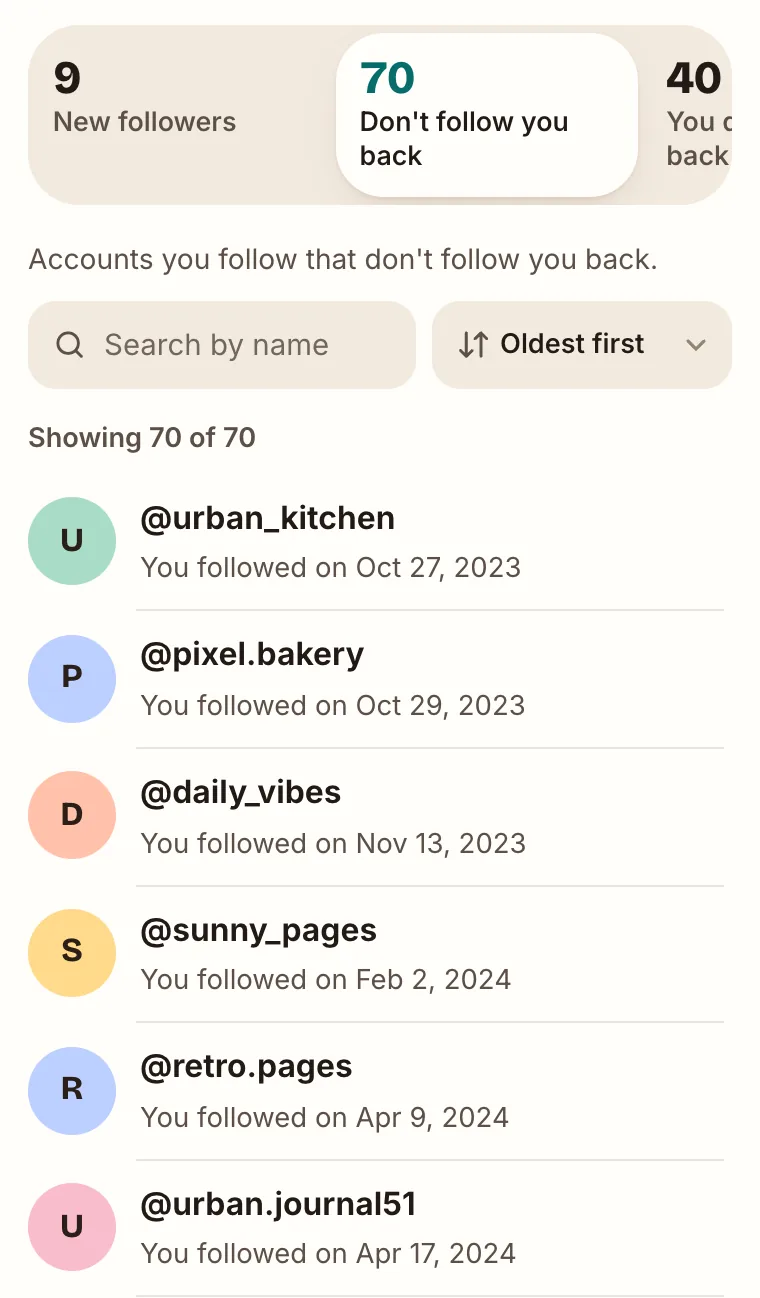
Don't follow you back in the TikTok tool, oldest first (sample data).
With Remember this result on this device switched on (the default), the results page marks every profile you've opened, and the marks survive a reload. A clean-up spread over several days picks up where you stopped. Only the usernames are saved, in your browser's own storage on that device.
The file is read in your browser tab. It isn't uploaded to us, and the tool never connects to TikTok, so it can't follow, unfollow or change anything on your account. Every unfollow is still a tap you make yourself in TikTok.
Before you unfollow anyone from the list:
- Not following back isn't unfollowing. The list includes creators and brands that never followed you, accounts that stopped following you at some point, and accounts that were deactivated. To see who actually unfollowed you, analyze a newer download later in the same browser. The steps are in how to see who unfollowed you on TikTok.
- The download is a snapshot. TikTok notes that the last 24 to 48 hours of some data may be missing, and anything that changed after the file was built isn't in it. If someone on the list now follows you, their profile shows it.
Opening a profile from the list is ordinary browsing on TikTok. If both of you have Profile view history turned on, that person can see your visit.
Common questions
Does TikTok notify someone when you unfollow them?
No. TikTok sends alerts for new followers, not for unfollows. The person would have to check their Followers list or notice that you're no longer friends.
Why can't I unfollow someone on TikTok?
If the button doesn't respond or the account comes back, TikTok's troubleshooting steps are: switch between Wi-Fi and mobile data, refresh the list several times, clear the app's video cache under Settings and privacy, and update the app. If you've just unfollowed many accounts in a row, take a break and try again later.
Why does my Following count not match my list?
TikTok has a help article on inaccurate following counts. Its advice: in the app, switch networks, clear the video cache and restart; on the web, refresh the page.
If I unfollow and follow someone again, will they know?
Following someone usually shows up in their notifications as a new follower. If you unfollow and follow back quickly, they may see that follow again, even though the unfollow itself sent no alert.
Can I see who I unfollowed?
The app has no list of accounts you unfollowed. Your data download only contains the accounts you follow now. If you kept an earlier download, you can compare its Following list with a newer one by hand. UnfollowTool's comparison between two analyses covers your followers, not the accounts you follow.
Is there a TikTok app that unfollows everyone who doesn't follow me back?
Not from TikTok. Third-party apps that do it need your login or control of your logged-in session, which TikTok's terms restrict. See mass unfollowing above for the manual alternative.