How to mass unfollow on Instagram: daily limits, action blocks and a safe method
Instagram has no button that unfollows many accounts at once. Every unfollow is one tap on one account, and Instagram doesn't say how many of those taps it allows per day. Below are the tools the app does have, what is known about limits, a way to work through hundreds of accounts by hand without losing your place, and how mass-unfollow apps get around the missing button.
Short answer: you can't mass unfollow inside Instagram. The safe way is to make a list of the accounts you want to drop, then unfollow them by hand in short sessions spread over several days, and stop for the day as soon as Instagram shows a limit message. Instagram doesn't publish a daily unfollow limit, so every number you read online is someone's estimate. Apps that unfollow in bulk do it by acting as you on Instagram, which Instagram's Terms of Use don't allow without its permission.
Disclosure: we make UnfollowTool. It reads the data export Instagram lets you download and shows who doesn't follow you back. It can't unfollow anyone, because it never logs in to Instagram or connects to it.
Does Instagram have a mass unfollow option?
No. Unfollowing works one account at a time. Instagram's help article describes it like this:
- Go to the profile of the account you want to unfollow.
- Tap Following, then tap Unfollow to confirm.
The button then says Follow again, and the other person isn't notified. If the account is private, you lose access to its posts, and following it again means sending a new request and waiting for approval.
A long list goes faster from your own Following list, because you skip loading each profile. Open your own profile, tap Following, type the username into the search field and tap the Following button next to the name.
Sorting and categories in your Following list
In February 2020, Instagram added two tools to the Following list, as TechCrunch reported at the time:
- Sorting by date followed, from earliest to latest or the reverse. Sorted earliest first, the accounts you followed years ago lead the list, and those are often the ones you no longer read.
- Categories such as Least interacted with and Most seen in feed, which group accounts by how much you engage with them and how often they fill your feed. TechCrunch presented them as a quick way to find accounts you might remove.
Instagram has redesigned this screen several times since, and we couldn't find a current Help Center article about these options. On your app version they may have different names or be missing.
The one bulk button is for followers
Instagram does have one bulk action, but it removes followers rather than unfollowing anyone. Accounts Instagram considers likely spam are filtered into a Potential spam list in your Followers tab. Per Instagram's help article on spam followers, you open your profile, tap your follower list, tap Potential spam, then Remove all spam followers. The removed accounts aren't told.
Instagram unfollow limit: how many a day?
Instagram doesn't publish a number. Its Help Center names only one hard limit around following: no account can follow more than 7,500 people, which Instagram says is there to reduce spam. There is no published limit per hour or per day for unfollowing.
The figures you find in blog posts and app listings come from the people who wrote them. Here is what a few sources say, checked in October 2026:
| Source | What it says about unfollow limits |
|---|---|
| Instagram Help Center | No unfollow limit published. The only number is the 7,500-account cap on following. |
| "Unfollowers Pro Tool" Chrome extension | Unfollows up to 144 profiles a day, and says Instagram's limits vary from account to account. |
| "Instagram Mass Unfollow" Chrome extension | Caps its paid plan at 150 unfollows a day, with a random pause of 3 to 8 seconds between unfollows. |
| Mass Unfollow Cleaner (iPhone app) | No number in the listing. It promises "safe batches", and the developer says in a reply to a review that Instagram's limits vary between accounts and can change at any time. |
Two of these developers say outright that the real limit depends on the account. Treat any figure, including an app's "safe" batch size, as an estimate. What you control is the pace: fewer unfollows per session, more sessions, more days.
"Try again later" and action blocks
If you unfollow many accounts in a short time, Instagram can stop the action and show a message saying it limits how often you can do certain things, or asking you to try again later. People usually call this an action block. The unfollow doesn't go through while it lasts.
We couldn't find an Instagram Help Center article that explains this message or says how long it lasts, so durations you read elsewhere are guesses. What Instagram does document:
- Account Status. In the app, go to your profile, tap the menu, and under More info and support tap Account Status. Per Instagram's help article, Features you can't use there lists restricted features, with a way to act on some of them.
- Restrictions for automation. Instagram can restrict accounts for data scraping. The reasons it lists include automated access to your account and giving your username and password to a third-party app.
- Removal of automated activity. According to Instagram's article on changing like and follow counts, likes, comments and follows that non-Instagram apps create automatically to make an account look more popular go against its Community Guidelines, and that activity is removed when Instagram finds it.
If you hit a block
- Stop for the day. Tapping Unfollow again and again until it goes through adds more of the same rapid activity.
- Check Account Status to see whether a feature is listed under Features you can't use.
- Cut off any app or extension that had access to your account. Instagram's scraping article notes that changing your password logs you out of all devices, including logins you don't recognize.
- Continue another day with smaller sessions and longer breaks.
How to mass unfollow safely, by hand
In a manual cleanup, the tapping is the easy part. The hard parts are knowing whom to unfollow and remembering where you stopped yesterday. Your data export handles both:
- Request your followers and following export. Open Accounts Center → Your information and permissions, tap Export your information, then Create export. Pick your Instagram profile and Export to device. Under Customize information, select only Followers and following, set Date range to All time and Format to JSON. The export guide shows each screen. A file this small is often ready within minutes to a few hours, though Instagram's Help Center allows up to 30 days.
- Open the ZIP in the "not following back" checker. Leave Remember this result on this device checked. The file is read in your browser tab and isn't uploaded.
- Sort the list. On the Don't follow you back tab, set Sort to Oldest first to see the accounts you followed longest ago first. The search field finds a specific name.
- Decide who stays. The list also holds brands, news accounts, artists and friends who simply never followed back. If you'd rather sort this out in a spreadsheet, use Download this list (CSV) and mark the keepers. The next section has rules of thumb.
- Unfollow in short sessions. Tap Open on a row, unfollow on Instagram, and come back. The row now shows Opened. Because the result is remembered, those marks are still there after a reload or the next day, so each session starts where the last one ended.
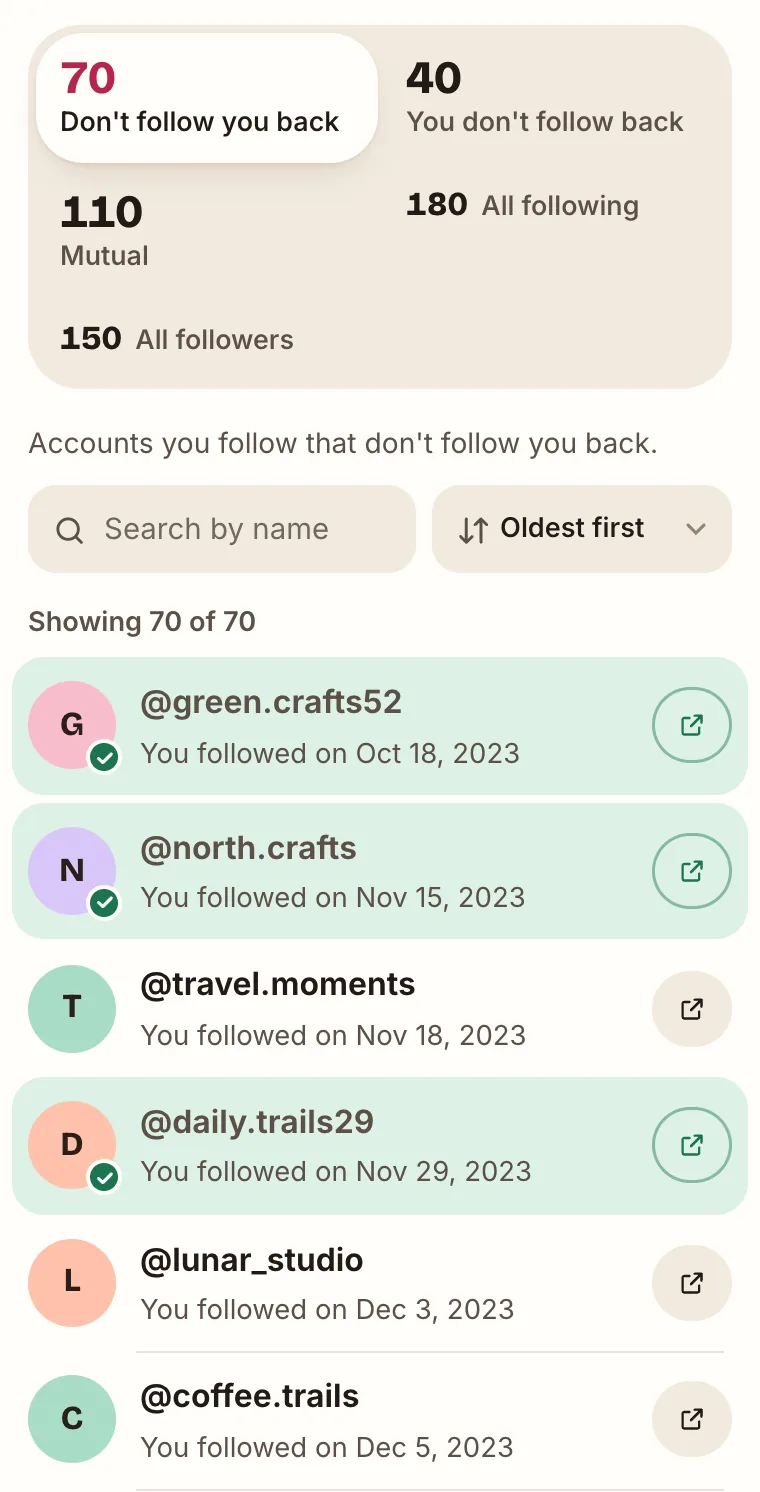
Rows you've opened are marked with a check (sample data). - Spread it out. Do one batch, take a break of a few hours, and continue the next day. At the first limit message, stop until tomorrow.
Three details make this smoother:
- Opened isn't the same as unfollowed. The mark means you opened the profile. If you open one and decide to keep following, note it in your CSV so you don't check it twice.
- The marks stay in that browser. Another device, another browser or a private window starts without them. If you switch between phone and computer, the CSV is the better checklist.
- The export is a snapshot. Accounts you've unfollowed stay on the list until you analyze a newer export. When you do, in the same browser, the results also show who unfollowed you since the last analysis. Our guide on seeing who unfollowed you explains how that comparison works.
Who to unfollow first
Instagram has no filter for inactive accounts, and your export doesn't say when an account last posted, so "inactive" is something you judge by looking. The Don't follow you back list narrows the field. These rules of thumb sort it:
- Start with Oldest first. The top rows are accounts you followed years ago that still don't follow you. They are the most likely to be forgotten or abandoned. Open one and check the date of its latest post.
- Treat brands and people differently. Brands, creators, news sites and public figures rarely follow anyone back, so their place on the list means nothing. Keep the ones whose posts you still read. For a person, a one-way follow that has lasted for years says more.
- Check recent follow-backs. Switch to Newest first. An account that followed you, got a follow back and is on this list a few days later used the follow-unfollow trick. It's an easy unfollow.
- Skip profiles that won't open. If an account was deactivated, deleted or renamed after your export, its Open link leads nowhere. Search the name in your own Following list in the app. If it isn't there, there's nothing to unfollow. A temporarily deactivated account is hidden until the owner logs back in, and that person may still follow you.
- Use Least interacted with if your app still has it (see above). It also finds accounts you ignore that do follow you back, which an export comparison can't.
Before you unfollow a friend or relative, search for them in your Followers list. The not-following-back page explains why someone who follows you can still end up on the list.
How mass-unfollow apps and extensions work
An app can only unfollow on your behalf if it is signed in as you. Three setups are common in the App Store and the Chrome Web Store:
- Phone apps that queue the work. Mass Unfollow Cleaner's App Store listing describes "Smart Campaigns" that split a large job into batches, keep running after you close the app and notify you of progress.
- Phone apps that run on the device. UnFollowAll's listing says it runs locally on your phone, unfollows in bulk and shows each unfollow in an activity log.
- Browser extensions. You open instagram.com while logged in, and the extension uses that session to read your lists and send unfollows one after another. The "Instagram Mass Unfollow" extension describes this setup and says you never type your password into it.
Where the work runs decides who holds your login or session. It doesn't change what reaches Instagram: unfollows sent from your account by software instead of by you.
What Instagram's rules say
- Automation. The Terms of Use say you can't access or collect information in an automated way without Instagram's express permission, and that this applies whether or not the automation runs while logged in to an Instagram account.
- Passwords. The same terms prohibit requesting or collecting Instagram usernames and passwords.
- Account access. In a help article about apps that offer likes and followers, Instagram explains that an app holding your login, by access token or by username and password, can gain complete access to your account, including your messages.
Nobody outside Meta knows how often accounts are restricted for using these tools. App store reviews include both satisfied users and people whose accounts were flagged after a first batch. Mass Unfollow Cleaner's developer, replying to one such review, describes these security prompts as normal platform behavior.
Apart from the rules, three practical points:
- Filters make mistakes. "Doesn't follow you back" also catches a friend who rarely opens Instagram or a relative with a private account. In bulk, you notice after they're gone.
- They cost money. Most are free to install and charge for real use: Mass Unfollow Cleaner sells weekly, monthly and yearly subscriptions, UnFollowAll a 30-day pass, and the "Instagram Mass Unfollow" extension a one-time Pro upgrade.
- They break. Recent App Store reviews report runs that stopped after one batch, apps that crashed, and runs that didn't unfollow anyone. One developer blamed a temporary problem on Instagram's side.
If you use one anyway, give Instagram a unique password, turn on two-factor authentication, and change your password when you're done. Our comparison of unfollower trackers and cleaner apps goes through each type in detail.
Unfollow vs. remove a follower
These are two different lists. Unfollowing changes who you follow. Removing a follower changes who follows you.
| Unfollow | Remove follower | Block | |
|---|---|---|---|
| What changes | You stop following them | They stop following you | They stop following you and can't find your profile or posts |
| Are they notified? | No | No | No |
| Where | Their profile, or your Following list | Your profile → Followers → X next to the name → Remove | Their profile |
| Bulk option in the app | None | Remove all spam followers, only for the Potential spam list | None |
Instagram's help article on removing followers describes the option for private accounts and names blocking as another way to make someone stop following you. On a private account, a removed follower has to send a new follow request to follow you again.
To find followers you might remove, open the You don't follow back tab in the same results: it lists everyone who follows you without a follow from you. Many of them are real people you just never followed. Our guide to spotting fake and bot followers helps tell them apart from spam.
Common questions
Can I unfollow everyone at once on Instagram?
Not in the Instagram app. There is no unfollow-all or select-many option. The only way to unfollow in bulk is a third-party app or extension that acts as your account, with the risks described above.
How many people can you unfollow on Instagram per day?
Instagram doesn't publish a number. The only published limit is that no account can follow more than 7,500 people. Figures such as 144 or 150 a day are caps that app developers set for their own tools, and some of those developers say the real limit varies by account.
Is there a free online Instagram following remover?
Online tools that unfollow for you need your login or a logged-in session, and most charge for regular use. Free export-based tools, including UnfollowTool, give you the list of who doesn't follow you back, and you unfollow yourself in the Instagram app.
How do I quietly unfollow someone on Instagram?
Just unfollow them. Instagram's Help Center says people won't be notified when you unfollow them. The same goes for removing a follower or blocking. They can still notice later, for example when your name is gone from their followers list. If you'd rather change nothing they could spot, Instagram has quieter options:
- Mute. On their profile, tap Following, then Mute, and choose posts, stories or both. You keep following them, and per Instagram's mute article, Instagram won't let them know.
- Close Friends. Share stories and other content only with your Close Friends list. People aren't notified when you add them to the list or remove them.
How can I quickly unfollow multiple accounts?
Not in one go, since Instagram has no select-many option. The quickest manual route is to work from a ready-made list and unfollow from your own Following list: search the name, tap Following, next. Speed then depends on how many short sessions you do, not on how fast you tap.
Can UnfollowTool unfollow accounts for me?
No. It never logs in to Instagram and sends nothing to it. It reads your export in the browser, shows the lists and links to each profile, and the unfollowing stays with you.