How to unfollow someone on Facebook: friends, Pages and groups
Unfollowing on Facebook takes someone's posts out of your Feed. You stay friends, you stay in the group, and the other person isn't told. Below are the steps for friends, Pages and groups, on a computer and in the app, followed by how unfollowing differs from snooze, take a break, unfriend and block.
The menu names below are the ones in Facebook's Help Center as of October 2026. Facebook renames settings now and then, so a label in your app may differ slightly.
Short answer: on one of their posts in your Feed, open Options (the three dots, •••) and choose Unfollow [Name]. Or go to their profile, tap Following, then Unfollow. For a group, tap Joined, then Unfollow group. You stay friends or a group member, and Facebook doesn't notify them. To undo it, go to Settings & privacy → Content preferences → Reconnect.
How to unfollow someone on Facebook
On Facebook you automatically follow everyone you're friends with. That's why a friend's posts show up in your Feed, and why you can unfollow a friend without ending the friendship. The same steps work for people you follow but aren't friends with.
From a post in your Feed
This is the quickest way when their post is right in front of you.
- Find one of their posts in your Feed.
- Click or tap Options (•••) in the top right of the post.
- Choose Unfollow [Name].
If only some of their posts bother you, Facebook suggests Not Interested on those posts instead. That shows you fewer posts like it without unfollowing anyone.
From their profile
- Go to their profile. Use the search at the top of Facebook if you can't find it.
- Click or tap Following.
- Choose Unfollow.
The steps are the same on a computer, iPhone and Android, according to Facebook's help article on unfollowing. On a friend's profile, the Friends button opens a menu that also holds Unfriend, which ends the friendship. If you only want their posts gone, choose Unfollow, not Unfriend.
Unfollow a Page
Pages belong to businesses, brands, organizations and public figures. Unfollowing one stops its posts in your Feed.
- On a computer: go to the Page, click Following, then Unfollow, and click Update to confirm.
- In the app: go to the Page, tap Following or Liked, then tap Unfollow.
The post menu works for Pages too: Options (•••) on one of the Page's posts, then Unfollow.
Unfollow a group without leaving it
Unfollowing a group keeps you in it. Its posts stop appearing in your Feed, but you can still open the group and read or post there whenever you want.
- Go to the group.
- Click or tap Joined.
- Choose Unfollow group.
The same Joined menu also has Leave group. That is a bigger step: according to Facebook's help article on leaving groups, you're removed from the member list, the group disappears from your list of groups, and you stop getting its notifications. Members aren't notified.
Unfollow several people at once
Going profile by profile is slow when you want to clear out your Feed. Facebook has a settings screen for it:
- Click your profile picture in the top right (on a computer), or tap Menu in the app.
- Choose Settings & privacy. In the app, tap Settings next.
- Open Content preferences. Some of Facebook's own help articles still call this section Feed, so look for either name.
- Choose Unfollow and pick the people, Pages and groups you want out of your Feed.
The same screen has Reconnect (people you unfollowed), Snooze (people you snoozed) and Favorites (people and Pages whose posts appear higher in your Feed). Facebook describes all four in its help article on content preferences.
Facebook's Help Center doesn't describe an "unfollow everyone" button. Browser extensions that unfollow in bulk typically work by clicking through Facebook in your logged-in browser, so they act as you. Facebook's Terms don't allow accessing or collecting data from Facebook by automated means without Facebook's permission, and they also forbid giving others access to your account. If you use one anyway, the risk sits with your account, not with the extension's maker.
Unfollow, snooze, take a break, unfriend or block
Facebook has five ways to see less of someone. They differ in how long they last and in what the other person can still see.
| Option | What it does | Still friends? | How to undo it |
|---|---|---|---|
| Unfollow | Their posts leave your Feed until you follow them again. | Yes | Reconnect in Content preferences, or Follow on their profile |
| Snooze | Their posts leave your Feed for 30 days, then come back on their own. | Yes | End Snooze in Content preferences, or Undo right after snoozing |
| Take a break | You see less of them, and you can hide your own posts from them and limit who sees past posts you're tagged in together. | Yes | Follow them again to see their posts; change the other settings back one by one |
| Unfriend | Ends the friendship. You also disappear from their friends list. | No | Send a new friend request |
| Block | Unfriends and unfollows them. They can't see your posts, tag you, invite you, message you or add you as a friend. | No | Unblock, then send a new friend request |
Snooze: a 30-day pause
Use snooze when someone posts a lot for a short time, for example during a trip or an election. On one of their posts, open Options (•••) and choose Snooze [Name] for 30 days. It works for people, Pages and groups. To end it early, go to Content preferences → Snooze and choose End Snooze. Details are in Facebook's snooze article.
Take a break: for an ex or a strained friendship
Facebook offers take a break when you change your relationship status to single or divorced or leave it blank, and you can also use it for a friend you want to see less of. According to Facebook's take a break article, it has three parts, and you choose which ones to use:
- See less of them: their posts and posts they're tagged in leave your Feed, and Facebook stops suggesting that you message or tag them.
- Limit what they see: they go on your Restricted list, so they only see your public posts and posts you tag them in.
- Edit who can see past posts: posts you're tagged in, or where you tagged someone else, can be limited so only the people tagged in them see them.
Unfollowing only overlaps with the first part: it takes their own posts out of your Feed. If you want to stay friends but stop sharing your own posts with someone, unfollowing isn't enough. Take a break or the Restricted list is the tool for that.
Unfriend and block
To unfriend, go to their profile, tap Friends, then Unfriend, and confirm. To block, go to their profile, open Options (•••) and choose Block, or add them under Settings & privacy → Settings → Blocking. Facebook has removed Block from the post menu in Feed, so it's no longer next to Unfollow there. Facebook's articles on unfriending and blocking have the full steps.
Does the person know you unfollowed them?
Facebook's help articles say plainly that nobody is notified for these actions:
- Unfollow: a friend you unfollow doesn't get a notification.
- Follow again: the person, Page or group isn't notified when you reconnect.
- Snooze: the profile, Page or group isn't notified.
- Unfriend: the person isn't notified.
- Block: profiles and Pages aren't notified.
- Leave a group: members aren't notified.
Facebook's take a break article doesn't say whether the other person is notified.
No notification doesn't mean nobody can ever tell. Someone you follow but aren't friends with sees you on their followers list, and you drop off that list when you unfollow them. Someone you unfriend no longer has you on their friends list. Someone you block may notice they can't find your profile.
A friend you unfollow has no list that shows it. They may still notice that you stopped reacting to their posts, because you no longer see them.
It works the other way around too: you get no notification when a friend unfollows you, and Facebook's Help Center describes no list of people who did. A friend who unfollows you stays on your friends list, so there's nothing to compare.
How to follow someone again
Following someone again is called Reconnect on Facebook. You have two ways, both described in Facebook's reconnect article:
- From your settings: Settings & privacy → Content preferences → Reconnect, then choose the person, Page or group. In the app, Content preferences is inside Settings, under Preferences.
- From their profile or Page: on a friend's profile, open Friends and choose Follow. On a Page, tap Follow; in the app you may have to open Options (•••) near the cover photo first. In a group, open Joined (or Options in the app) and choose Follow group.
See who you follow and who you unfollowed
On a computer, open your profile, click Friends below your cover photo, then open More in the Friends section and choose Following. If Following isn't there, you don't follow anyone yet. Facebook's help article on following only gives this path for computers.
People you unfollowed are listed under Content preferences → Reconnect, and people you snoozed under Snooze. Check there if you've forgotten who you muted.
The people you follow can always see that you follow them. Who else can see the list is a setting: Settings & privacy → Settings → Followers and public content, then Who can see the people and Pages you follow?
Review who you follow with your Facebook export
A note up front: we make UnfollowTool. Our Facebook tool can't unfollow anyone, and it never connects to Facebook. It reads the data export that Facebook lets you download, so you can see your lists side by side before you decide who to unfollow on Facebook yourself.
To get the export, go to Settings & privacy → Settings → Accounts Center (or Meta Account) → Your information and permissions → Export your information → Create export. Choose your Facebook profile and Export to device. Under Customize information, select only Friends and followers, set the date range to All time and the format to JSON. Facebook prepares the file in the background and keeps it available for 4 days. Every screen is explained in our guide on how to download your Facebook friends list.
Open the ZIP in the Facebook tool. It's read in your browser tab and isn't uploaded. What you get:
- Don't follow you back: people and Pages you follow that don't follow you back. Friends are left out, because Facebook friends follow each other automatically. Expect many Pages and public figures here, since they rarely follow back. It's a list to review, not a list to unfollow in full.
- You don't follow back and Mutual, plus your friends, removed friends and friend requests.
- No longer friends: if you leave Remember this result on this device on and analyze a newer export later in the same browser, this tab lists people who were your friends last time and aren't anymore. They unfriended you, one of you blocked the other, or they deactivated or deleted their account. The export doesn't say which.
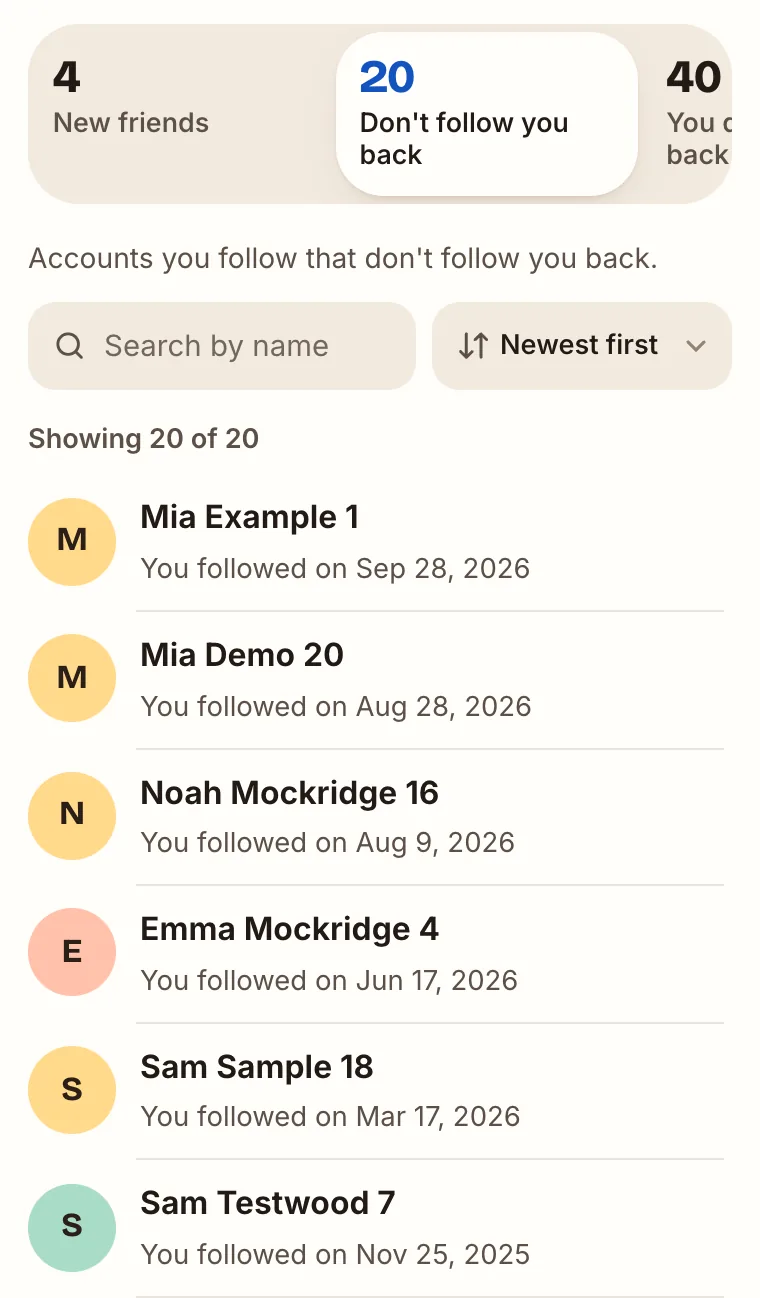
Every list has search, sorting and a CSV download. Facebook's export contains display names only, without profile links, so you'll have to search for a name on Facebook to unfollow that person.
What the tool doesn't show: which friends you've unfollowed or snoozed (Facebook lists those under Content preferences), and friends who unfollowed you but are still your friends.
Common questions
Does unfollowing someone on Facebook unfriend them?
No. You stay friends, and they can still see your posts as before. Unfollowing only changes your own Feed.
Can someone I unfollowed still see my posts?
Yes. To hide your posts from a friend without unfriending them, use take a break or add them to your Restricted list. Restricted friends only see your public posts and posts you tag them in.
What happens when a snooze ends?
After 30 days their posts return to your Feed. Under Content preferences → Snooze you can end a snooze early or add more time.
Why can't I find the Unfollow option?
You can only unfollow a profile you follow. If you're not friends and never followed them, there's nothing to unfollow. If you can't find the profile at all, Facebook says it may be deactivated; a block on either side also hides it. Labels vary too: some of Facebook's help articles call Content preferences Feed.
Can I see who unfollowed me on Facebook?
Not for friends who unfollowed you and stayed friends. Facebook doesn't notify you, and its Help Center describes no list of them. You can find out who is no longer your friend by comparing two friends exports, which the Facebook tool does for you.